10.5.1 Setting up a static IP
Setting a static IP address for Tapo cameras ensures reliable and uninterrupted operation and at the same time ensures reliable and uninterrupted use of your cameras throughout the network. For continuous streaming via RTSP, connecting to an ONVIF compatible system or storing video on a NAS, setting a static IP address for your Tapo camera/doorbell is highly recommended.
Note: Not all models support the setting of a static IP address. This function is not available for:
- Certain older models, including C100/C200/TC60/TC70, hardware version 1.0 and 2.0.
- Battery-powered cameras
Support may vary depending on the model and firmware version.
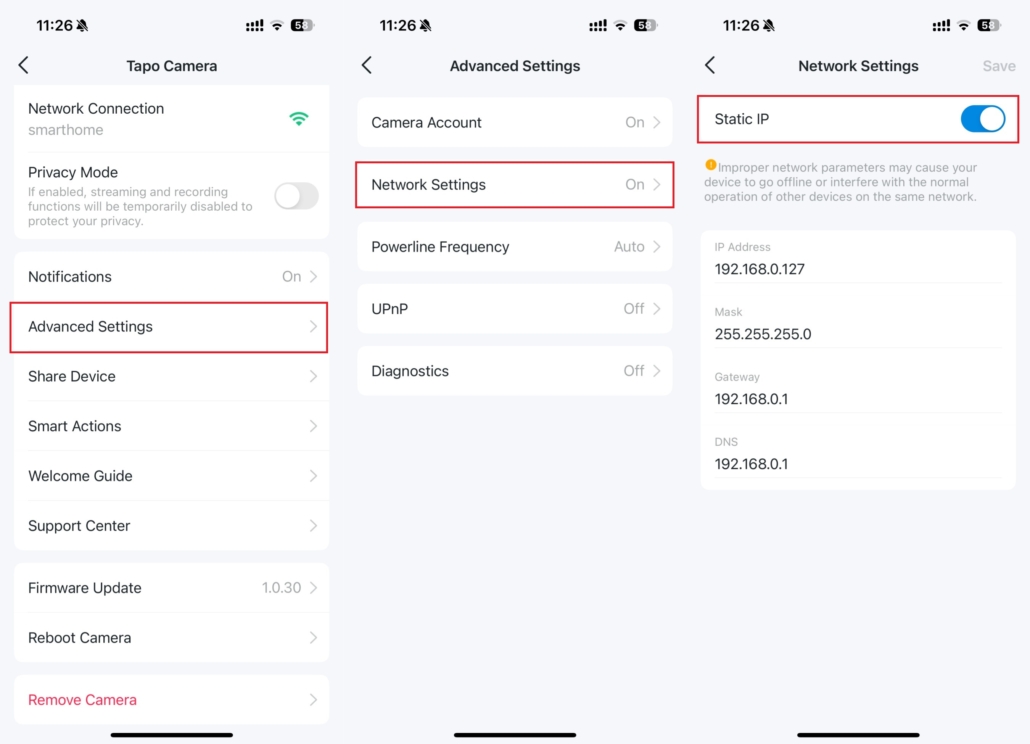
Follow the instructions below to set up a static IP address for your camera.
- Open your Tapo app, select the camera and navigate to Device settings > Advanced settings > Network settings > Static IP